Short Answer:
- Use 256 kb/s AAC-LC (for stereo). Everything will sound great.
- Too much? OK, AAC-LC 128 kb/s is pretty good.
- Still too much? Now it depends, read below.
- You have a really great (>$100K) listening room, or you are emotionally worried you’re losing something: Use FLAC or other lossless codec.
- Need loudness control? Use xHE-AAC instead.
In my work in the audio coding industry, customers would often ask: “What bitrate should I use?” It depends. Higher bitrates usually provide higher perceived quality but cost more to store and transmit.
If storage or transmission cost is not a factor, then a lossless codec like FLAC or ALAC is an easy choice if it’s conveniently supported by the playback device or app.
If storage cost, transmission cost, or playback support is a factor, then a lossy codec is appropriate. Lossy codecs attempt to discard information that can’t be perceived by listeners due to auditory masking. However, they have to discard enough information to maintain a selected bitrate. Sometimes information is discarded that is perceivable and codec artifacts result.
Through listening tests, it is possible to assign a perceived quality rating to test content encoded at different bitrates, resulting in a graph such as this:
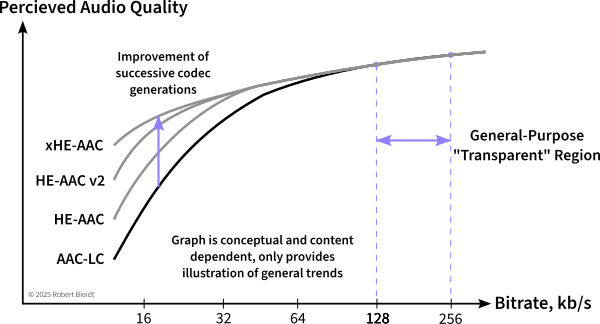
One can see that increasing the bitrate leads to diminishing returns of quality as a knee in the curve is reached. Operation past this point is what I’ve termed the “General Purpose” bitrate range where most content will be heard artifact-free under most listening conditions. This is an easy range to consider as the codec won’t really get much better beyond this range, and any artifacts are likely to be very subtle. Some people call this the “transparent” range, but that implies there are no artifacts of any kind in any situations, which is not the case.
For AAC-LC, this bitrate range is typically 128 to 256 kb/s for stereo content.
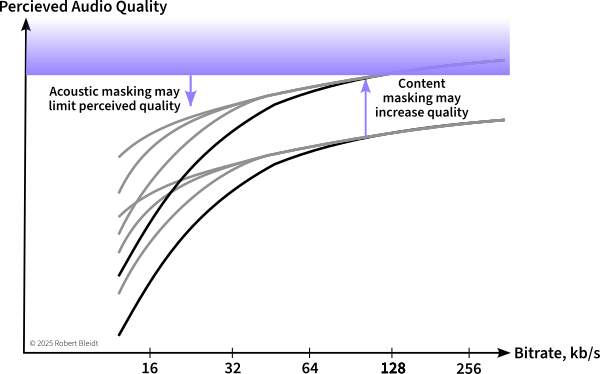
If it is too expensive to operate in this range, then the content and listening conditions need to be considered. Challenging content such as solo instruments or well-recorded speech will lead to artifacts that are more easily perceived, while the listening environment may mask small artifacts at higher bitrates.
Why is some content harder to encode?
Sometimes in sales demonstrations, I would have prospects ask for classical music, thinking it would be challenging to encode. A symphony or ensemble is usually not that challenging since there are many instruments playing together, and the sounds / spectrum of one instrument can mask that of another and also mask some artifacts. One instrument by itself can be much more difficult since there are no other sounds to mask or hide the artifacts.
I can usually get a good initial impression of a codec’s worst-case performance by listening to three test tracks: harpsichord, glockenspiel, and castanets from the EBU SQAM CD. These are recordings of individual instruments in dry studios. Harpsichord has a very detailed harmonic structure, castanets has very sharp and distinct transients, and glockenspiel has transients and a dynamic spectrum.
The other difficult signal type is speech. Speech has a lot of transients, but also bursts of tonal information, and it has a high peak-to-average ratio. These features make encoding speech difficult, and often a speech-only codec is used for lower bitrates in cases where music is not present. (xHE-AAC includes a switchable speech codec internally for this purpose) At higher bitrates, general-purpose codecs can encode speech well. SQAM 49 and 50 are my favorite test items for speech.
At least for me, there are short-term artifacts, and then there are impressions that develop over minutes. At a dentist’s office, there is usually satellite or internet radio delivered through the typical 8-inch intercom speaker. It’s unremarkable background for the first minute or two, and then I start noticing how rolled-off the highs are and the smearing of transients.
An optimal bitrate would result in artifacts just below the level of perceptibility on the most difficult content that will be encoded when heard under the best listening conditions expected. Finding such an optimal bitrate can involve a lot of work. Classically this is done through expert listening tests, though today at Internet scale, large providers can use A/B tests or other indirect measures. The advantage of operating in the General Purpose range of bitrates is this exacting optimization becomes unnecessary.
Also, consider long-term effects that may not show up in a formal listening test. What sounds and scores just satisfactory in a test of 30-second clips may not be good enough when listened over a longer period.
Background noise, room acoustics, and speakers mask artifacts
Just as content can provide masking of artifacts, the listening environment can as well. Background ambient noise is the primary way the environment masks artifacts, but there can also be masking of transient artifacts from room reflections or poor speaker transient response.
The background noise while driving in a car will often be in the 75 -85 dBA SPL range, as will an airliner flight. This provides a strong masking of artifacts.
Home listening may have a 35-45 dBA background noise level, and less artifacts will be masked. A TV set or smart speaker may have 1-3% distortion and ± 5 to 10 dB of frequency response flatness, plus other transient distortions. The room may also have acoustic reflections that mask transient artifacts.
In a professional listening room or mixing room, the background noise is usually NC 20 or NC 25, and room treatment limits early reflections. Stereo speakers are usually in the $1K to $10K range and have good performance.
In a mastering room or critical listening room, the noise floor may be even lower, and room design and treatment will have been optimized to attenuate (> 20 dB) reflections inside the Haas range. Stereo speakers are usually $10K-100K here and state of the art.
It’s possible to reduce the influence of room acoustics and the cost of playback equipment by using electrostatic headphones. Stax headphones have been the industry standard for listening tests for decades due to their frequency response and distortion. However, headphones won’t help the background noise level very much, they can introduce frequency response variations due to a listener’s HRTF, and the sound image will be perceived differently.
Thus, when judging a bitrate, listening should be primarily done in the best environment the consumer is expected to listen in. Obviously, a service that has 0.01% of listeners with purpose-built and treated home theaters can discount those and set a reasonable expectation. Sometimes this is “the system the CEO has at home.”
What is an Artifact?
Well, it’s a distortion of the original input signal caused by “not having enough bits.” This results primarily in spectrum differences, often dynamic ones, and sometimes transient smearing or echoes. At lower bitrates, there are sometimes stereo image differences, though these are usually less objectionable.
I could spend some time presenting artifact samples here, but the Audio Engineering Society has already done that in detail: Take a look at the AES Perceptual Audio Codecs – What to Listen For website. Or, take your favorite content and encode it at the lowest bitrate possible.
What about later and better codecs?
AAC-LC was developed around 2000, and since then there have been three improved generations: HE-AAC, HE-AAC v2, and xHE-AAC. As shown in the conceptual graphs above, succeeding generations have greatly improved the low bitrate performance, but don’t really offer any improvement at higher bitrates and thus high quality levels. If you are working with lower (<48-64 kb/s) bitrates, one of the newer generations will provide better quality. If there is speech in the content, consider xHE-AAC as it offers a separate encoder mode for speech that provides improved speech quality. xHE-AAC is also worth considering in general as it offers guaranteed control of average loudness, which may improve intelligibility and listener fatigue.
A website I developed allows comparison of xHE-AAC to AAC-LC at various bitrates: https://www2.iis.fraunhofer.de/AAC/xhe-aac-compare-tab2.html
I can’t speak as authoritatively to the Dolby codecs, but I think in general the same observation holds: Lower bitrates sound better with newer versions such as AC-4, higher bitrates (640 kb/s) not so much.
Immersive audio almost requires new immersive codecs such as Atmos or MPEG-H, as these new codecs include system features for rendering and the codecs offer efficiency from spatial redundancies. They may introduce spatial artifacts which tend to be less objectionable than traditional coding artifacts.
Can VBR (Variable Bitrate) Help?
Audio codecs usually offer two bitrate control modes, constant bitrate and variable bitrate. In constant bitrate mode, the encoder will keep the bitrate constant, either strictly for each encoded audio frame, or within the limits of a standardized decoder buffer (“bit reservoir”). Variable bitrate mode adjusts the bitrate during encoding to provide a constant perceived quality level as predicted by the encoder’s internal perceptual model.
Why isn’t VBR always used? The instantaneous bitrate with VBR can be very “bursty.” On extremely challenging content at maximum quality, the encoder might be operating in the lossless range, using 700 kb/s for stereo. If some silence occurs, the bitrate may drop to almost zero. With traditional broadcasting, these bitrate peaks are too extreme for the communications channel. For file-based playback, the bursts don’t matter. Particularly on speech content, VBR can reduce the overall file size compared to CBR.
Maybe Bitrate is Not the Solution
If there is a low bitrate budget, it may be worthwhile to consider reducing the sample rate of the content. Nicer-sounding 16 kHz content could be better than artifact-filled 48 kHz content. Many encoders will start to roll-off the encoded bandwidth at low bitrates if they think that will result in better audio quality. You may want to try a lower sample rate such as 16 or 22 kHz if it is supported by your targeted playback devices. Note that later generations of codecs typically use some type of bandwidth extension technology and thus a test with them is also a good step.
Video content, except at very low resolution, will overwhelm the contained audio bitrate, yet the viewer will likely notice an audio quality loss more than a video one. Video services in particular may use adaptive streaming techniques such as DASH or HLS to adapt the bitrate dynamically to the consumer’s connection.
In adaptive streaming, a “ladder” or set of bitrates is encoded. A video service may consider a fallback from surround or immersive content to stereo at lower bitrates. The stereo fallback could be spatialized or pseudo-surround as well to help mask the image change that would occur which switching.
In some cases, bitrate decisions are based on purely economic factors. Satellite services often have a fixed allocation of radio spectrum and have to trade off the number of programs they can provide versus the audio quality. They may elect to monitor customer churn or complaints as they lower bitrates and will likely allocate higher bitrates to channels with more demanding or popular content.
Generational Losses
Most audio codecs are designed and intended for encoding the final product only once for delivery to the consumer. In practice, audio is often encoded and decoded several times in broadcast contribution and other use cases. When this is done it’s like making a Xerox of a Xerox, or maybe more appropriately, like making a JPG of a JPG file. The quality will suffer, but maybe not much in the first few generations. It’s best to start with a bitrate higher than will be used for final transmission.
You can hear what a severe case sounds like here.
Cautions from an Industry Insider
Since I no longer work for a codec supplier, there’s a few points I can be forthcoming about:
Quality Claims. You should be skeptical of the claims of codec suppliers, the press, influencers, creatives, or colleagues about codec quality or the superiority of a codec. The only thing you should trust is an independent, double-blind listening test on content similar to yours at the bitrates you intend. Any party promoting a codec, even MPEG, will exclude unfavorable results. If you can’t conduct your own test (I’m writing an article on this soon) you might look at hydrogenaudio.com. I don’t really know them, but their methodology is fairly sound.
You should never trust objective models (like PEAQ or similar projects) to provide more than a general indication of quality. If they really were 100% accurate, the industry would not do listening tests.
Emotional and Human Factors. As codecs are built for “humans in the loop”, there are always emotional factors in codecs and bitrate decisions. Creatives have sometimes complained that lossless codecs are affecting the sound quality. Consumers will upgrade to lossless streaming on their services and listen to them through Bluetooth headphones or pairing that drops the top octave. Music and entertainment are emotional by nature and so there are always non-scientific considerations.
In the 2010’s AAC was getting a lot of complaints from the music recording industry that AAC was ruining their music with artifacts at 128 or 256 kb/s stereo. I added an ABX test function to the “Sonnox Fraunhofer Pro-Codec” Pro Tools plug-in that blindly scored a self-administered ABX test. Having to guess whether X was the original or the coded version really reduced those complaints. I suspect because the complainers couldn’t reliably identify the coded version in a ABX test.
Alternately, in that period I was also testing Windows playback of AAC and it didn’t sound right. I eventually learned Windows was resampling the output of the decoder (and some other audio sources) with a sample rate converter that was junk and had horrible aliasing. So, sometimes in theory a system should be perceptually transparent, but in practice the implementation is broken and the emotional opinion is correct.
There are two societal trends to consider: In the 1990’s 128 kb/s MP3’s were considered acceptable, but that was before the advent of improved earphones and streaming services operating at 128-256 kb/s AAC-LC. The quality bar is higher today.
Conversely, many consumers consumers today have listened only to compressed audio. They often prefer in-head headphone imaging as “natural” compared to spatialized imaging and they may ignore some artifacts since they are habituated to them.
A secondary trend is the resurgence of vinyl LP’s. They offer tactile ownership that a stream doesn’t, and due to technical limitations they can’t be compressed, limited, and clipped as much as digital formats.
Finally, most consumers have not seen codec rate/distortion graphs. In their mind, perhaps helped by careful marketing, 256 kb/s AAC might be “twice as good” as 128 kb/s.
Royalty-free Codecs. Are there good codecs that are royalty-free and open-source? Absolutely. MP3 is one, and AAC-LC is as well. You can find a good AAC-LC open-source encoder and decoder in the Android source code. (Search for “FDK”) These codecs are royalty-free since they were developed and patented more than 20 years ago, and the patents have expired.
You can be for or against the social and economic contract that patents provide, or think that particular patents are brilliant or obvious, and it doesn’t matter. If a party has patents they think are infringed and they assert them, you can either pay a royalty or go to court and hope you win a lawsuit. For example, the Opus website said for years and still says “Opus is a totally open, royalty-free, highly versatile audio codec.” Yet Vectis IP launched an Opus patent pool to collect royalties in 2023 and filed their first lawsuit (through Dolby) in 2024. Some of the sued parties have settled, so I suppose the patents have some merit.
Keep in mind there is plenty of wishful thinking or speculation on the Internet written by people who are not attorneys or businessmen with knowledge of the (often confidential) situation. Also consider that there is some risk to an IP holder in starting a lawsuit without a strong position. If a court rules against them, this may preclude or diminish future royalties.
On the other hand, in many cases someone else may have already paid codec royalties for you on a popular codec and device. Audio codec licensing is often done on a device basis, though sometimes applications that have their own decoder are not covered. As a practical matter, what you do at home, and likely what you do in source code, is not interesting to licensors since there’s not enough potential revenue to justify their time.
(Disclaimer: I’m not an attorney and this is not legal advice, just speculation for your entertainment. If you plan on deposing me, expect to pay witness and attorney fees.)
Encoder Quality. Proprietary codecs like Dolby and DTS have strict control over their encoder software and the encoded quality is uniform. Open-standard codecs such as MP3 and AAC may have good and bad encoder implementations and you need to search and/or test to find the good ones. If you need an inexpensive way to get good encoding for testing, I can recommend “EZ CD Audio Converter.” It’s a small but legitimate and licensed company.
Secret Sauce. From time to time, particularly in the video domain, you may hear of “breakthrough technology” that far outperforms the current state of the art. I’ve sat though many such presentations, or at least the portion until I smelled the snake oil. Audio coding is a mature technology today and there aren’t many innovations that will break the triad of perceived quality, computation cost, and bitrate that modern codecs provide.
That said, if you are willing to increase the computation cost by an order of magnitude or two, machine learning techniques can really improve the perceived quality at lower bitrates. So, in that sense, it is a “breakthrough” that has been enabled by the continuing improvement in computer performance.